• English
  • Deutsch
  • Español
  • 中文简体
  • 中文繁體
  • 日本語
  • 한국어
  • ไทย
  • Tiếng Việt
  • 240 px
  • 320 px
  • 480 px
  • 640 px
  • 800 px
  • 960 px
No data
  • 8 fps
  • 10 fps
  • 12 fps
  • 15 fps
  • 20 fps
  • 24 fps
No data
  • 0.5×
  • 1×
  • 1.5×
  • 2×
No data
  • Original ratio
  • 1:1
  • 9:16
  • 16:9
No data
  • No limit
  • 1 MB
  • 2 MB
  • 5 MB
  • 10 MB
  • 15 MB
No data
ArtPlayer logoArtplayer
ArtPlayer Editor
Artplayer AI
Subtitle EditorFree Video Tools

Video Upscaler
X GIF Downloader
Change Volume
Image Upscaler
Loop Audio

Video Screenshot
Remove Watermark
Trim Video
Pixelate Video
Merge Video
Compress Video
Video Stabilizer
Blur Video
Reverse Video
Split Video
Frame Interpolation
Fade Video
Flip Video
Image to Video
Add Audio
HLS to MP4
Remove Metadata
Countdown Video
Blur Background
Speed Video
Rotate Video
Resize Video
Adjust Video
Normalize Video
Split Screen Video
Video to GIF
Edit Metadata
Add Subtitles
Add Text
Boomerang Video
Crop Video
Remux Video
Inspect Metadata
Loop Video
Scene Splitter
M3U8 Downloader
Video Understanding
Extract Thumbnail
Video Converter
Green Screen
Pixelate Face
Mute Video
Add Watermark
Image Slideshow
Blur Face
Stop Motion Effect
Filter Video
GIF to MP4
PDF to Video
Thumbnail Sprites
Add Photo
Landscape to Portrait
Extract Tracks
Animated Circles
Add Intro Image
Video to HLS
Solid Color Video
Video Overlay
Freeze Frame
Video to Text
Sync Audio and Video

Facebook Video Downloader
X Video Downloader
TikTok Video Downloader
Instagram Video Downloader
Threads Video Downloader
Reddit Video Downloader
Pinterest Video Downloader
Pinterest GIF Downloader
Tenor GIF Downloader
GIPHY GIF Downloader
Imgur Video Downloader
Imgur GIF Downloader

Add Cover Art
Speed Audio
Join Audio
Trim Audio
Vocal Separation
Filter Audio
Extract Audio
Measure Loudness
Equalize Audio
Split Audio
Change Volume
Normalize Audio
Add Reverb
Remove Silence
Reduce Noise
Audio Visualizer
Fade Audio
Convert Audio
Change Pitch
Reverse Audio
Text to Speech
Compress Audio
Detect BPM
Speech to Text

GIF Upscaler
AI Image Expander
Remove Watermark
Old Photo Restore
Depth Map
Blind Watermark
GIF Optimizer
Image to Prompt
Background Changer
Remove Background
Remove Object
Remove AI Labels
AI Image to GIF

Screen Recorder
Voice Recorder
Camera Recorder
GitHubDocsAbout

FREE TWITTER / X GIF DOWNLOADER

Twitter / X GIF Downloader

Download GIFs from public Twitter / X posts. Also supports links from Facebook, TikTok, Instagram, Threads and Reddit.Save the original video or create a .gif file in your browser.

  • X / Twitter
  • Facebook
  • TikTok
  • Instagram
  • Threads
  • Reddit

GIF editor

Your next GIF starts here. Add a link above or open a file below.

Choose a clip
00:00.000:00.000:00.0
s

Frames: 0 · Clip and GIF duration: up to 30 seconds each · Up to 360 frames.

How to download GIFs from Twitter / X

Save a Twitter GIF as a .gif file in three steps. You can also use another supported post link or a local video.

1

Paste or open

Copy a public Twitter / X post link, paste it above and select Get video. You can also open a video or GIF from your device.

2

Choose a clip

Trim the clip, crop the picture, and adjust width, frame rate and playback speed.

3

Create and download your GIF

Select Create GIF, then Download GIF to save the .gif file. You can also download the original video without converting it.

For desktop and mobile steps, read our guide to downloading GIFs from Twitter / X.

A few things to know

Answers to common questions about video downloads and making GIFs.

Which links can I use?

Public video posts from X / Twitter, Facebook, TikTok, Instagram, Threads and Reddit, including X GIF posts. Private, deleted, age-restricted or region-restricted posts may be unavailable. Support depends on the source platform and its download service.

Are my files uploaded to a server?

Local videos and GIFs stay in your browser. Social post links are sent to our server and a download service to find the video. The video is then loaded onto your device, where GIF conversion happens. Choose Create share link to upload the exported GIF to our Google Drive. You do not need a Google account.

Can I download the video without making a GIF?

Yes. Once the video is found, select Download video to save it. You can use the GIF editor whenever you want to make a GIF.

What are the size and format limits?

Local files can be up to 1 GB; online videos up to 50 MB. Each exported GIF can be up to 30 seconds and 360 frames. GIFs opened for editing are also limited to 360 frames and 30 seconds, and must fit within the browser’s decoding memory limit. Video playback depends on the codecs supported by your browser. If a file cannot be opened, try an MP4 encoded with H.264.

Why did a link stop working?

Download links are temporary. Fetch the post again to get a fresh link. If a platform or its download service is unavailable, try later or open a video you already have.

How do I save a Twitter / X GIF as a .gif file?

Paste a public Twitter / X post link and choose Get video. X often supplies GIF posts as MP4 video, which you can save directly. To export a .gif, select a time range, adjust width, frame rate, playback speed and crop, then choose Create GIF. Private or unavailable posts cannot be fetched.

How do I download a Facebook video as MP4?

Paste a public Facebook video or Reel link and choose Get video, then Download video to save the available MP4. Available formats and resolutions depend on the source; some posts may not be accessible.

Is GIF Downloader free? Do I need an account or an app?

GIF Downloader is free to use and does not require an account or software installation. Open the website in your browser to download supported videos or create a GIF, within the file and duration limits above.

Why does my GIF have no sound?

The GIF format does not support audio. To keep the available audio, use Download video instead of exporting a GIF. A source video without audio will still be silent.

How can I make my GIF file smaller?

Choose a shorter clip, reduce the width or lower the frame rate. You can also set Max file size so the tool can adjust width and frame rate. If the limit cannot be met, shorten the clip or choose a larger limit.

Where is my GIF saved after conversion?

With auto-download enabled, GIF Downloader starts the download as soon as conversion finishes. Your browser settings determine where the file is saved or whether you are asked to choose a location. If the download does not start, select Download GIF below the preview. Keep the page open until you have saved the file.

How do playback speed and cropping work?

Choose 0.5×, 1×, 1.5× or 2× playback speed. Speed changes frame timing, not the selected source range or frame count: slower playback makes the GIF longer. The frame rate setting controls how many source frames are sampled per second; playback frame rate also changes with speed. Crop keeps the original ratio or takes a centered 1:1, 9:16 or 16:9 region shown by the blue preview frame. It does not change the original video download. Both the selected clip and exported GIF must stay within 30 seconds, with up to 360 output frames.

How do I download a Threads video?

Paste a public Threads post link from threads.com or threads.net and choose Get video, then Download video. You can also make a GIF from the loaded video. Private or unavailable posts cannot be downloaded.

How do I convert MP4 to GIF online?

Open a local MP4 or paste a supported public video link. Select a clip, set the width and frame rate, then choose Create GIF. Use Download GIF to save the result. Local files are converted in your browser without being uploaded.

Can I download Twitter GIFs in HD?

Video resolution depends on what the source post and download provider make available. Choose an available video variant to download. GIF output width is limited to 960 px and never exceeds the cropped source width. A file size limit may reduce width or frame rate.

How do I save Twitter GIFs on iPhone or Android?

Copy a public post link into this page in your phone’s browser, then choose Get video. To save a .gif, create one with Create GIF and select Download GIF. The browser controls the save location. Conversion depends on browser codec support and available memory.

How do Google Drive share links work?

Choose Create share link to upload the exported GIF to our Google Drive. You do not need a Google account. GIFs up to 50 MB are supported. Anyone with the link can view and download the file. Shared files are kept for 7 days after upload. Automatic cleanup runs once a day, so deletion normally occurs within 24 hours after the 7-day period; after deletion, the link stops working. Reusing a link does not extend its expiry. Download your GIF if you want to keep it.

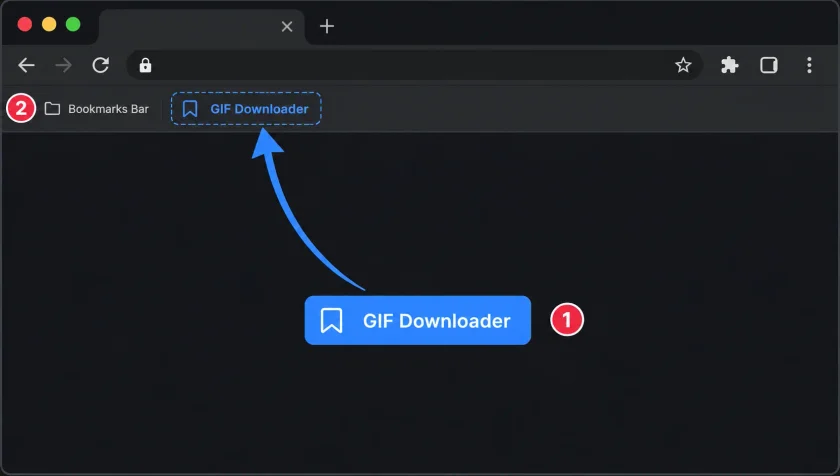
Download with a bookmark

Open a video post on X, Facebook, TikTok, Instagram, Threads or Reddit, then send it straight to GIF Downloader.

GIF Downloader

Drag the button to your bookmarks bar.

Drag GIF Downloader to your bookmarks bar, then open a video post and click the saved bookmark.

Then open a supported video post and click the saved bookmark to get the video here.

For desktop browsers with a bookmarks bar. On mobile, copy the post link and paste it into the input above.

Related tools

Continue editing with nearby ArtPlayer tools that work with the same local, browser-first workflow.
X Video Downloader
X Video Downloader
Find MP4 download links for videos in public X or Twitter posts.
GIF to MP4
GIF to MP4
Convert an animated GIF into a compatible MP4 locally in your browser.
Video to GIF
Video to GIF
Convert MP4 and other video clips into looping GIFs with local browser processing.
View all tools
ArtPlayer logoArtplayer

Free browser media tools for editing, converting, recording, and preparing video, audio, subtitles, and AI-assisted results.

Email us: [email protected] Buy Me a Coffee

Video tools

Change VolumeVideo ScreenshotRemove WatermarkTrim VideoPixelate VideoMerge VideoCompress VideoVideo StabilizerBlur VideoReverse Video

Audio tools

Loop AudioAdd Cover ArtSpeed AudioJoin AudioTrim AudioVocal SeparationFilter AudioExtract AudioMeasure LoudnessEqualize Audio

Image tools

Image UpscalerGIF UpscalerAI Image ExpanderRemove WatermarkOld Photo RestoreDepth MapBlind WatermarkGIF OptimizerImage to PromptBackground Changer

Downloaders

X GIF DownloaderFacebook Video DownloaderX Video DownloaderTikTok Video DownloaderInstagram Video DownloaderThreads Video DownloaderReddit Video DownloaderPinterest Video DownloaderPinterest GIF DownloaderTenor GIF Downloader

Site

Free Video ToolsTool usage statisticsArtPlayer EditorSubtitle EditorBlogAboutFAQDocs
© 2026 ArtPlayer. All rights reserved.
PrivacyTermsCookiesAcceptable UseCopyright

Essential cookies keep ArtPlayer working. You choose whether to allow optional cookies. Cookie Policy